 Image 1 of 2
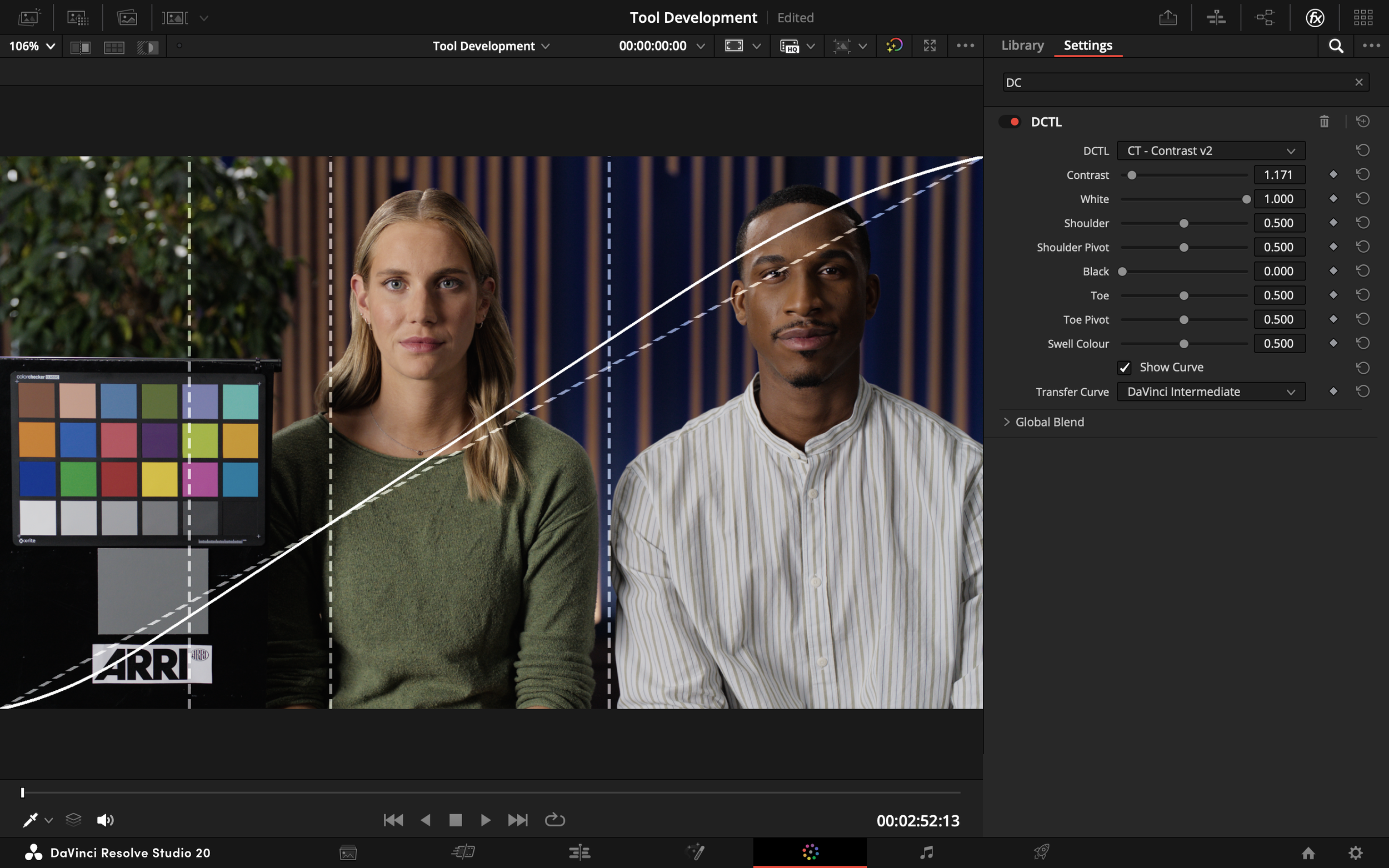 Image 2 of 2
-
This tool offers intuitive control over the shape of your contrast curve, allowing you to independently adjust both the highlights and shadows, as well as the overall contrast strength. It’s not trying to reinvent the curve—just streamline it with clear, efficient controls that help speed up your workflow without sacrificing flexibility.
Contrast: Controls the strength of the central linear slope — the core contrast of the image.
White: Sets the peak value of the white point — how bright the brightest parts of the image can go.
Shoulder: Adjusts the softness and curvature of the highlight roll-off.
Shoulder Pivot: Defines the transition point where the linear midtones begin to curve into the shoulder.
Black: Sets the darkest value — the black point of the image.
Toe: Controls the softness and curvature of the shadow roll-off.
Toe Pivot: Defines the transition between the linear midtones and the toe curve in the shadows.
Swell Colour: Governs how much saturation is boosted along with contrast — useful for retaining or suppressing chroma shifts introduced by strong contrast moves.
Show Curve: Overlays the adjustment curve on the image.
Transfer Curve: The transfer curve of your timeline colour space.
-
Contrast can work in DaVinci Intermediate, Arri Log C3, and ACEScct.
